Turn On/Off AirDrop on iPhone
How to turn on and off AirDrop function on my iPhone?
✍: FYIcenter.com
 Here are the correct steps to turn on AirDrop function on your iPhone.
1. Turn off Personal Hotspot with "Settings > Personal Hotspot > Off". Personal Hotspot and AirDrop are using the sample transfer mechanism. So they can not be used at the same time.
2. Turn on Wi-Fi with "Settings > Wi-Fi > On". AirDrop requires Wi-Fi to send or receive files.
3. Turn on Bluetooth with "Settings > Bluetooth > On". AirDrop requires Bluetooth to send or receive files.
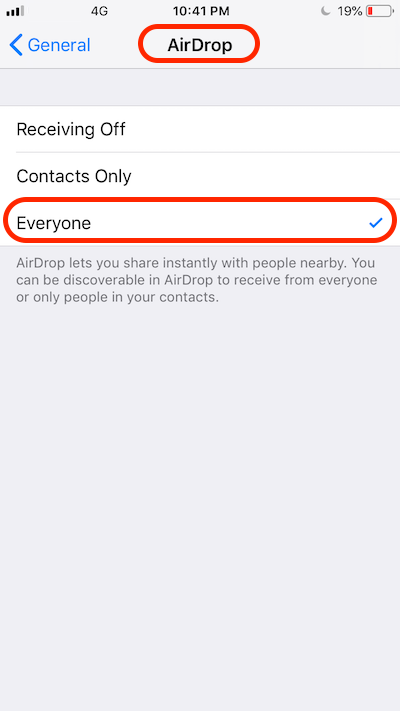
4. Go to "Settings > General > AirDrop" or open Control Center. You see 3 options:
Receiving Off
Contacts Only
Everyone      - Checked
5. Check the "Everyone" option to turn it on.
Once AirDrop is turned on. Your iPhone is ready to send and receive files with other nearby Apple devices.
With "Everyone" option turned on. Any other nearby Apple devices can see your iPhone showing up on their AirDrop list.
If you are concerned about your privacy, you should set it to "Contacts Only", so only your friends can exchange files with you.
If you want to turn off AirDrop function, you should set it to "Receiving Off".
The picture below shows you how to turn on and off AirDrop on your iPhone:
⇒ Turn On/Off AirDrop on macOS
2020-02-20, ∼2670🔥, 0💬
Related Topics: