AirDrop PDF File Out Off iPhone
How to AirDrop PDF books and other files out off my iPhone to my friends?
✍: FYIcenter.com
 Here are the correct steps to send PDF books and other files
from your iPhone to your friends iPhone and Apple devices.
Here are the correct steps to send PDF books and other files
from your iPhone to your friends iPhone and Apple devices.
1. Turn on AirDrop on your iPhone, in "Setting > General > AirDrop".
2. Ask your friends to turn on AirDrop on their iPhones or iPads, and select the "Everyone" option on their devices.
3. Move your iPhone closer to your friends. And ask your friends to keep their device open, not locked.
4. Go to "Books" app and open the PDF file you want to send. Or other apps for other types of files. You see the share button at the top (or bottom).
5. Tap on the share button and select "AirDrop". Devices of your friends should be listed in AirDrop area. If not listed, verify that device is unlocked and AirDrop is turned on.
6. Tap on the devices your want to send the picture. The "Waiting" status is displayed under the device name.
7. Ask your friends to accept the incoming file. Alerts of incoming files should be displayed on their devices.
8. Verify the transfer status on your iPhone. You should see "Sent" status displayed.
Now your friends should be able enjoy your nice PDF book.
The picture below shows you how to AirDrop photo/video from your iPhone to your friends.
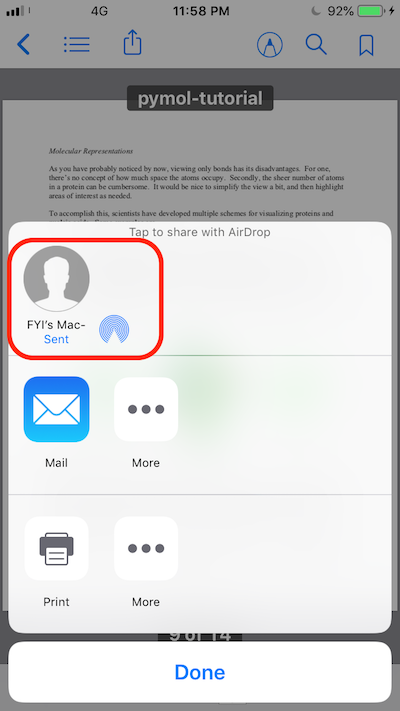
On your iPhone, you can use AirDrop on several other apps to send different types of files out off your iPhone. Here is a list:
Photos - Pictures and Videos
Books - PDF and ePUB files
Email - Attachments
Files - Any files
Unfortunately, you can not use "Music" app to AirDrop music files out off iPhone.
⇒ Receive AirDrop PDF File on macOS
⇐ Receive AirDrop Photo/Video on iPhone
2020-05-15, ∼3330🔥, 0💬
Related Topics:

