Add More Trusted Phone Number in Apple ID
How to add more trusted phone numbers in my Apple ID account from my iPhone? I want to another trusted phone number just in case I don't have access to the first phone number.
✍: FYIcenter.com
 A trusted phone number stored in your Apple ID account
can be used to verify your identify by Apple support or
the two-factor authentication process to login on a new device.
You should have one or more trusted phone numbers in your Apple ID account.
A trusted phone number stored in your Apple ID account
can be used to verify your identify by Apple support or
the two-factor authentication process to login on a new device.
You should have one or more trusted phone numbers in your Apple ID account.
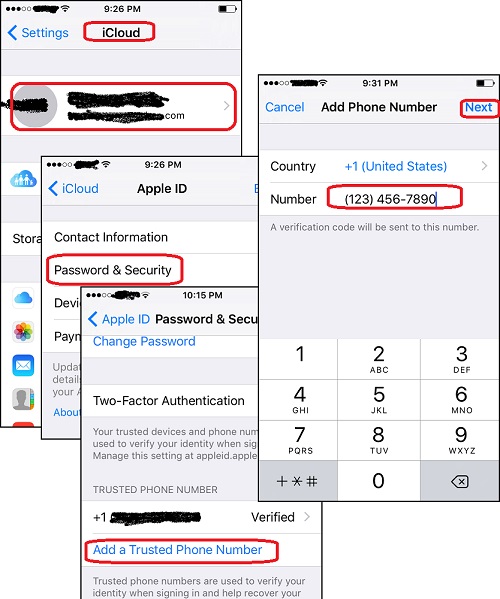
You can follow these steps to add more trusted phone numbers in your Apple ID account from your iPhone:
1. Tap on "Settings > iCould" on your iPhone. And sign in to your Apple ID account. You see the "iCloud" screen.
2. Tap on your Apple ID. You see the "Apple ID" screen.
3. Tap on "Password & Security". You see the "Password & Security" screen.
4. Tap on "Add a Trusted Phone Number". You see the "Phone Number" screen.
5. Enter the phone number you want to add and tap on "Next". You see the "Verification Code" screen.
6. Go to the phone of the phone number you just entered. You see a text message from Apple that contains a 6-digit verification code.
7. Enter that verification code back to the "Verification Code" screen on your iPhone. You see your new phone number listed in your Apple ID account as verified.
Now you another trusted phone number added to your Apple ID.
The following picture shows you steps to add a trusted phone number to your Apple ID account:
⇒ Verify Two-Factor Authentication with Web Browser
⇐ Setup Two-Factor Authentication for Apple ID
2017-10-08, ≈19🔥, 0💬

