Cropping Photos with iPhone Photos App
How to crop photos with iPhone Photos app? I want to cut a portion off my photo.
✍: FYIcenter.com
 The crop and rotate tool in iPhone Photos app allows you to crop your photos.
You can cut a portion off your photo
using these steps:
The crop and rotate tool in iPhone Photos app allows you to crop your photos.
You can cut a portion off your photo
using these steps:
1. Open Photos app and tap on "Albums" near the bottom of the screen. You see your photos listed in different albums.
2. Tap on "Camera Roll" to open the camera roll. You see a list of photo previews displayed.
3. Tap the photo you want to enhance. You see the photo displayed in full size.
4. Tap "Edit" near the top right corner of the screen. You see some editing icons displayed.
5. Tap on crop and rotate icon near the bottom left corner of the screen.
 You see a cropping frame displayed.
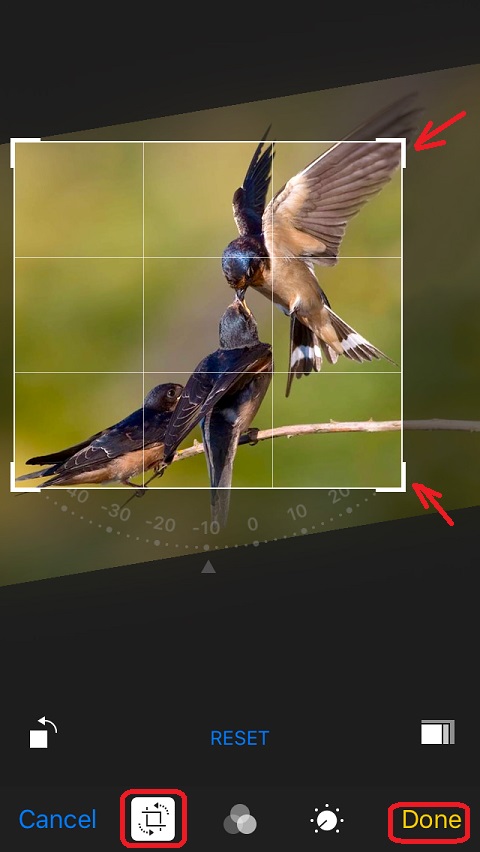
6. Drag the corners of the frame towards the center to set your own crop. The portion outside the frame will be removed.
7. Tap "Done" near the bottom right corner of the screen to save the change.
The picture below shows you how to crop photos in Photos app
on your iPhone (source: birdnot.org):
⇒ Straightening Photos with iPhone Photos App
⇐ Removing Red Eyes with iPhone Photos App
2017-07-07, ∼2589🔥, 0💬
Related Topics:
